top of page


How to sign up for NICA races in Pit Zone
-
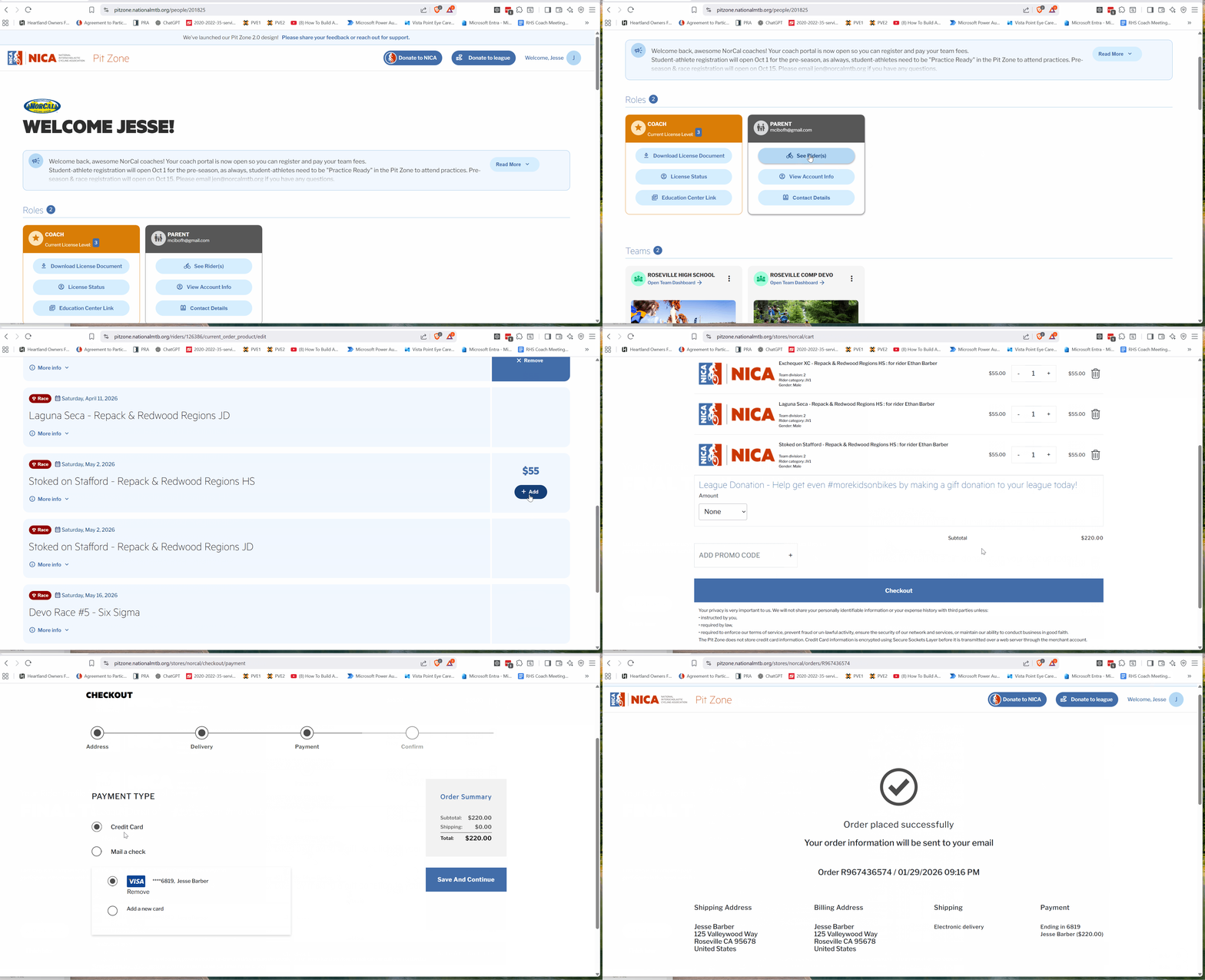
Log in to your account.
-
Look for the Parent card.
-
Click See Rider(s).
-
Select your rider.
-
Click Register for Events for your rider.
-
Agree to the League Refund Policy.
-
Add the races you want to attend (Rule 2.13 – Compliance with Race Guidelines). You can add them all now. If you do not, just know that for individual student-athletes, the race registration deadline is typically the Wednesday before the race at 11:59 PM. Athletes who register after this pre-registration deadline or on race weekend will be placed at the back of their category, regardless of previous standings.
-
Click Pay fees now.
-
Review your selections and click Check out.
-
Click Save and Continue.
-
Enter your payment method, then click Save and Continue.
-
Click Place Order.
Here is a video of the process.
bottom of page